
Let’s Play: Piggydb Knowledge Creation #2 – “What I Talk About When I Talk About Running” by Haruki Murakami
Posted: December 19, 2012 Filed under: letsplay Leave a commentThis is the second installment of Let’s Play Knowledge Creation with Piggydb.
It’s been about three months since the last time. As I wrote on the Facebook page, I’ve been going through drastic changes in my work situation. Even though in such a situation, I’m reading books in spare moments in order to collect materials for new articles. The only problem is the lack of my ability, which slows me down in writing new articles.
Anyway, the book featured this time is “What I Talk About When I Talk About Running” by Haruki Murakami.

Haruki Murakami is a Japanese novelist and probably the most famous Japanese contemporary novelist worldwide. And this book is one of his essays published relatively recently (in 2009).
Here is the passages that interest me in the book:
http://piggydb.jp/example/fragment.htm?id=23
I squeezed two concepts (‘endurance‘, ‘passed through‘) out of the passages this time, but didn’t find any explicit relationships between the last time (Stephen King) and this time. Naturally, only two books should by no means lead to any remarkable structure. So I should concentrate to input more material for the time being.
Piggydb V6.5 – Fragments View Label
Posted: December 15, 2012 Filed under: uncategorized Leave a commentA small release to get the rhythm again … 😉
This release adds a description label to Fragments View:
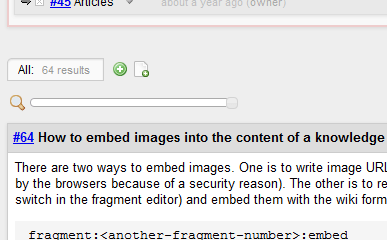
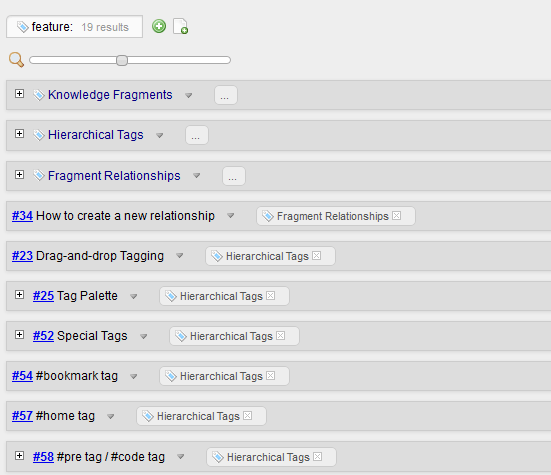
As you can see in the above screenshots, the label also shows the number of found fragments.
You can download it from here.
PiggyPoster – A Piggydb fragment posting App for your iPhone
Posted: November 11, 2012 Filed under: uncategorized 1 CommentYesterday, I noticed a post on Piggydb’s facebook page from Tobias Kamber who had just released a iPhone app called “PiggyPoster”. I immediately installed it on my iPod touch and tried it out. It turned out to be a simple and nice app just focusing on one task: to post a fragment to your Piggydb.
PiggyPoster on iTunes – https://itunes.apple.com/ch/app/piggyposter-piggydb-fragment/id573951897?mt=8


One thing that may be a bit of hurdle is that you need to have Piggydb installed on an Internet-accessible server so that your iPhone can access to it, but if you can meet this requirement, it is worth trying out.
So if you are interested, try it out and send feedback to Tobias. I am really looking forward to seeing the future development of PiggyPoster.
Tobias’s websites:
- Software Atelier Kamber – http://www.software-atelier.ch/
- iPhone Apps – Software Atelier Kamber – http://iphone.hom3.ch/?lang=en
The Piggydb Way: #2 Tags as First-Class Components
Posted: October 20, 2012 Filed under: essay, thepiggydbway 2 CommentsMost of you who happen to stumble upon piggydb.net are sure to know what you want, I imagine. You are looking for a tool (in the categories like wiki, outliner, personal database, etc) that helps you organize your information in a more effective way as an alternative to, for example, Evernote or Springpad. Then suddenly, I began to talk about the ‘reversal process’ instead of explaining the basic organizing functionality. You might be confused or think you didn’t need it because you knew what kind of information you were going to organize and how to organize it, and you just needed a tool to support it. Well, okay, but is that really the case? Are you really sure you know what you want?
When you are about to collect information and organize it, quite naturally, you know what kind of information you are going to organize, and anticipate the result. It may be information about your project, daily routines, a travel plan, or it may be a diary. You have already prepared the container in which you are going to just place pieces of information one by one. It would be quite straightforward, you think. However, once you begin it, something in you will be stimulated by what you are doing, and sooner or later, you will unconsciously step into the area of Knowledge Creation even with a most primitive container you use, such as a piece of paper.
Let’s suppose that you keep a record of things you have done in your daily life in a plain old paper notebook. You do so because you want to use these information later on when you need to know what you did and when you did it. And then, one day, after a while since it became a daily routine, you reflect on the record. In that reflection, you happen to find an interesting pattern in the log. You underline these places with a red pen and write an explanation of the concept common to them in your own way. This discovery is totally what you didn’t expect when you started this habit. I’m sure many of you have experienced something like this before if you have a note-taking habit. Let’s call this kind of practice ‘Weighting Information‘ (selecting a certain part of information and putting some meaning into it). So you acquired a new point of view as a result of weighting information.
Information weighting appears whenever you deal with information. For example, if you are reading this article on a web browser (I believe most of you are), it must have a bookmarking function. Bookmark allows you to save addresses of websites that you want to revisit later, and it can be regarded as a way of information weighting. You select a small bit of the vast sea of the Web and attach the concept of ‘bookmark’ to it.

As you may have noticed in the example of recording things done, there are two steps in information weighting. The first one is the discovery of an interesting commonality across random things and the second one is putting a label on it. In this process, the mechanism of the discovery is especially interesting and mysterious. One of the most interesting things about it is that you can’t expect the outcome in advance, in other words, you can’t plan what kind of thing you are going to discover.
The other day, I came across an interesting column on innovation titled “The Idea Idea” by Peter J. Denning (http://cs.gmu.edu/cne/pjd/PUBS/CACMcols/cacmMar12.pdf). Denning brought skepticism to the popular belief that an innovation is the result of adopting a good idea. He proposed a hypothesis that “practices rather than ideas are the main source of innovation” and “many ideas are therefore afterthoughts to explain innovations that have already happened“. The term ‘idea‘ here can be replaced by ‘concept‘ that we are discussing about. In the above example of information weighting, the concept discovery was not expected or planned but happened in the course of the practice of recording things done in daily life.
Stephen King, a world-renowned novelist, once wrote about his style of writing novels. He wrote in his memoir “On Writing” as follows: “I distrust plot for two reasons: first, because our lives are largely plotless, even when you add in all our reasonable precautions and careful planning; and second, because I believe plotting and the spontaneity of real creation aren’t compatible.” The ‘plot‘ mentioned in the quote would correspond to the ‘idea‘ in Denning’s column. As Denning said practices are the main source of innovations and ideas are afterthoughts to explain innovations that have already happened, King said stories pretty much make themselves in the course of writing and progress to theme. And King’s figurative expression for his creative process is really impressive: “stories are found things, like fossils in the ground“. Although I don’t know of many novelists, I imagine there are not a few novelists who take this type of approach. Haruki Murakami, who reportedly leads race for Nobel prize for literature as of writing this article (the winner turned out to be Mo Yan who happens to have the same family name as my wife), is one of them. This spontaneity would be essential for creative process and I think that human beings instinctively know it because, as King wrote, “stories are relics, part of an undiscovered preexisting world”
After discovering a concept, you need to put a label on it so that it can be a part of your knowledge. And through this label, you can view the world around you in a fresh-new viewpoint. This kind of concept-oriented knowledge building is the main focus of the Knowledge Creation in Piggydb.
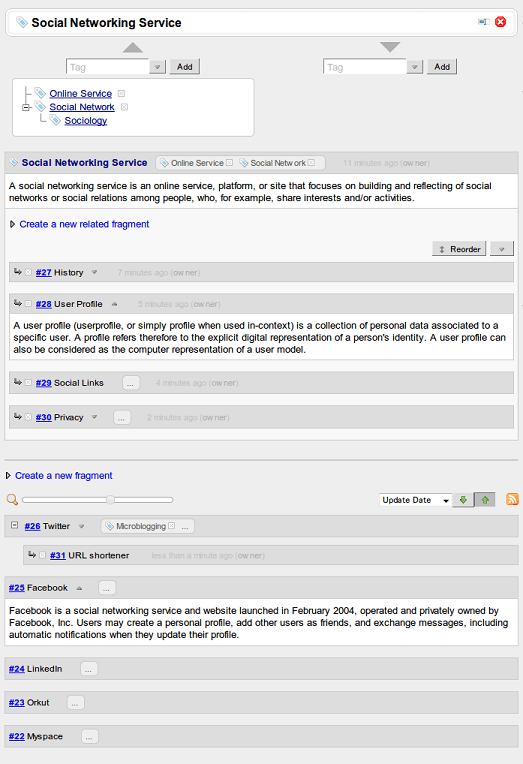
The most important feature of Piggydb in terms of concept-oriented knowledge building is Tag-Fragments. A tag-fragment, which is the kind of a knowledge fragment whose ‘as-a-tag’ attribute is enabled, can be used to represent a concept that you have discovered as in the above episode or selected as a theme in advance for your study or investigation. Originally, classic tags have played an assistant role in the Web 2.0 systems providing a lightweight way of organizing information. And, of course, you can use these tags to represent found concepts other than familiar categories. However, this means just grouping elements by concepts, which does not contain any structure for the concepts.

As you might know already, the labels of concepts themselves do not solely hold the value of your knowledge. They are just labels. The value resides in the context behind concepts, the context in which you have come to discover and build the concepts (the Internet is filled with fruitless communication triggered by responding to keywords without considering their contexts). Therefore, the important factor deciding the value of your concepts is how you structure this context information, and that’s why Piggydb introduces Tag-Fragment that supports two-layer structure allowing you to evolve found concepts into more rich and structured knowledge. While classic tags is no more than collective keywords for indexing, Piggydb’s tags can be treated as the same as the first-class information components (knowledge fragments) in a database, which means they can have their description and relationships to other components.
[To be continued]
Piggydb V6.4 – Smart Layout
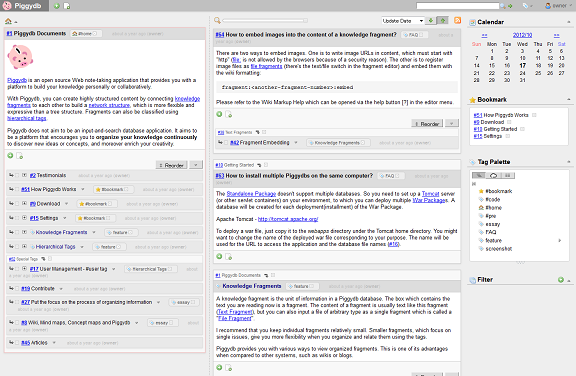
Posted: October 17, 2012 Filed under: uncategorized Leave a commentThis release introduces Smart Layout, which switches the page layout automatically between vertical and horizontal layout according to the window width.
The following is the vertical layout, which was the standard layout in the older versions:
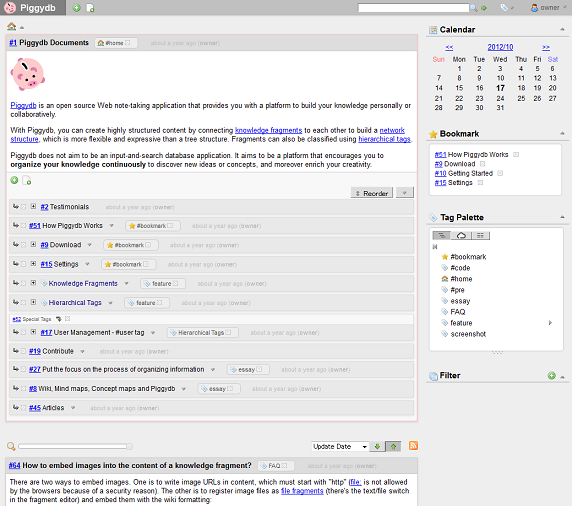
And when you make the width of your window wider than the certain extent, the layout will switch to the horizontal layout automatically:
You can resize the panes by drag-and-drop on the split bar.
Although this feature is still in an experimental phase, it would be useful if you have a high-resolution display. I’ve come up with several ideas in this experiment so far. So please look forward to updates 🙂
You can download it from here.
Piggydb V6.3 – A New Level of Zoom: Full-Fledged
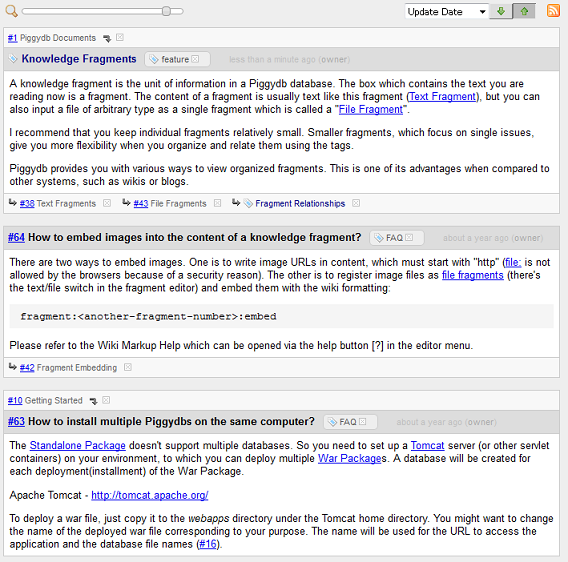
Posted: October 1, 2012 Filed under: uncategorized Leave a commentThis release updates the Fragments View Slider to have a new level of zoom: ‘full-fledged‘.
In the older versions, sliding the slider to the right end shows the fragments in ‘detail‘ view as follows:
In this version, a new level of zoom ‘full-fledged‘ has been added next to the ‘detail‘ as follows:
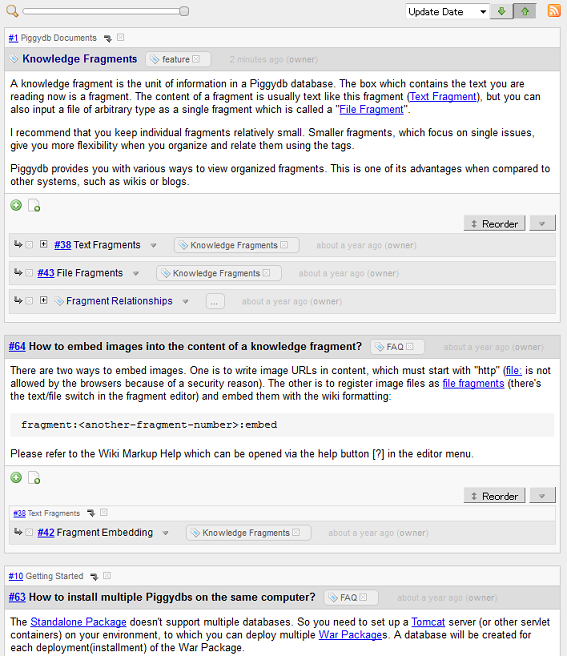
As you may have realized in the screenshots above, the default color scheme has been improved a little bit.
You can download it from here.
Let’s Play: Piggydb Knowledge Creation #1 – “On Writing” by Stephen King
Posted: September 25, 2012 Filed under: letsplay 2 CommentsI’ve launched yet another demo for Piggydb.
Piggydb Knowledge Example – http://piggydb.jp/example/
I’m going to show you an actual example of Knowledge Creation, which is introduced in “The Piggydb Way“, by combining with this series of articles “Let’s Play: Piggydb Knowledge Creation”.
To be honest, I have no idea of what it will turn into or what kind of knowledge will be created. So I’m looking forward to seeing how it goes.
You should note that this is just one of countless ways of using Piggydb and I don’t intend to declare that this is the proper way while it would be a certainly interesting and creative way that I think is worth to try out.
So, let’s get started.
The basic process is quite simple. You read randomly selected books and record passages that interest you as knowledge fragments in your Piggydb.
Stephen King’s “On Writing” is the book I selected for the first installment of this series. I randomly picked this book up from my unread books shelf.

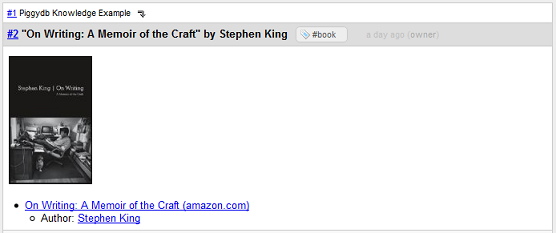
First of all, I created a fragment that represents the book and tagged it #book so that I can list all the books I’ve input later on.
Then, I added sub-fragments of the book fragment for the passages that interest me.
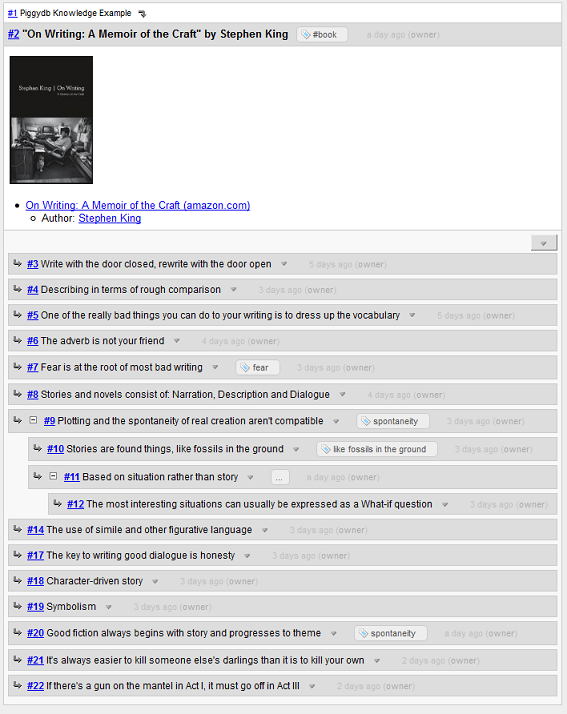
It is a little bit tiresome to manually type all the passages into Piggydb …
After that, I looked through the fragments and found the concepts that interest me. I created tags for these concepts: “fear”, “spontaneity”, “like fossils in the ground”.
At first, these concepts don’t necessarily need to be a word or noun. “like fossils in the ground” is a phrase in this case. And even a sentence could be a tag. As your database grows, you will probably find (or even invent) suitable words for the concepts.
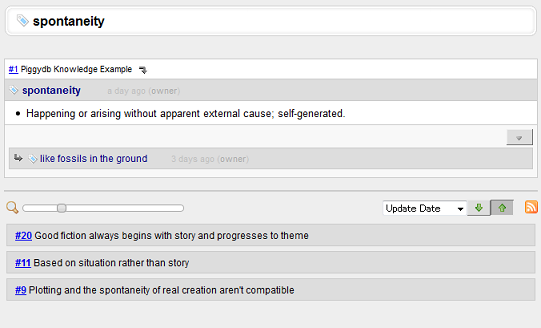
Ok, that’s it for this time. I hope I can find unexpected correlations and concepts as I input more books.
If you have any recommendations for books (essay or fiction would be better) or find interesting things in the demo database, please drop me a line.
So, thank you for reading this far and please look forward to the next installment 😉
Piggydb 6.2 Supporters Edition Released!
Posted: September 21, 2012 Filed under: supporters 4 CommentsI’ve just released Piggydb 6.2 Supporters Edition with two bonuses.
1) Predefined inline style CSS (a kind of wiki extension) that you can easily import by @import rule.
Just put the following line in your CSS:
@import "http://piggydb.sourceforge.net/theme/inline.css";
Then, you can use the following predefined styles:
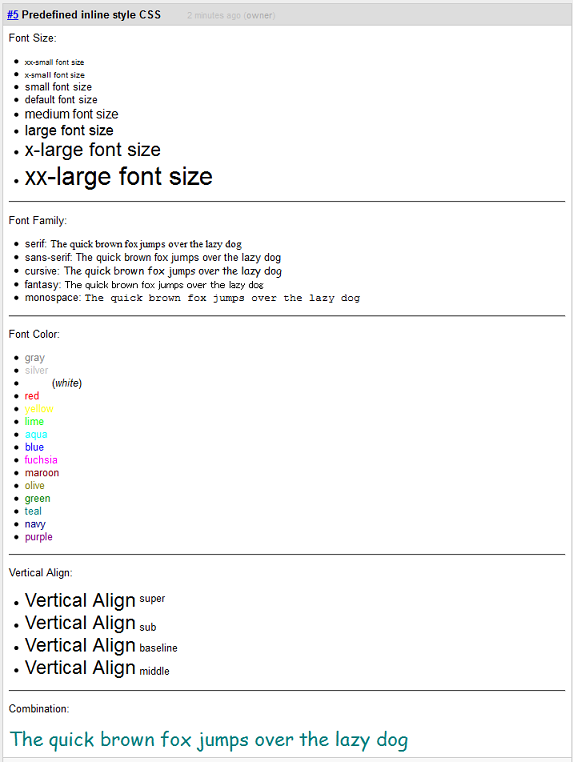
Font Size:

- {{[xx-small] xx-small font size}}
- {{[x-small] x-small font size}}
- {{[small] small font size}}
- default font size
- {{ medium font size}}
- {{[large] large font size}}
- {{[x-large] x-large font size}}
- {{[xx-large] xx-large font size}}

----
Font Family:

- serif: {{[serif] The quick brown fox jumps over the lazy dog}}
- sans-serif: {{[sans-serif] The quick brown fox jumps over the lazy dog}}
- cursive: {{[cursive] The quick brown fox jumps over the lazy dog}}
- fantasy: {{[fantasy] The quick brown fox jumps over the lazy dog}}
- monospace: {{[monospace] The quick brown fox jumps over the lazy dog}}

----
Font Color:

- {{[gray] gray}}
- {{[silver] silver}}
- {{[white] white}} (''white'')
- {{[red] red}}
- {{[yellow] yellow}}
- {{[lime] lime}}
- {{[aqua] aqua}}
- {{[blue] blue}}
- {{[fuchsia] fuchsia}}
- {{[maroon] maroon}}
- {{[olive] olive}}
- {{[green] green}}
- {{[teal] teal}}
- {{[navy] navy}}
- {{[purple] purple}}

----
Vertical Align:

- {{[x-large] Vertical Align}}{{[v-super] super}}
- {{[x-large] Vertical Align}}{{[v-sub] sub}}
- {{[x-large] Vertical Align}}{{[v-baseline] baseline}}
- {{[x-large] Vertical Align}}{{[v-middle] middle}}

----
Combination:

{{[x-large cursive teal] The quick brown fox jumps over the lazy dog}}
2) The source code for the additional features.
From this version, the Supporters Edition contains the source code for the additional features. Since the source code for the standard features is available on GitHub, it’s become a full open source software.
Click here to buy Piggydb Supporters Edition (Thank you for your support 😉 )
Piggydb V6.2 – Home Fragments as Expandable Trees
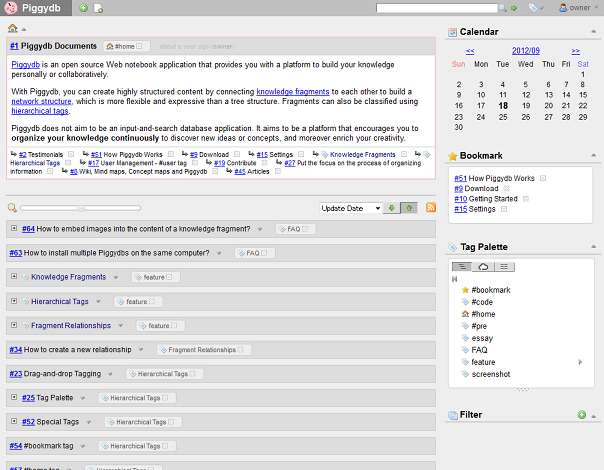
Posted: September 18, 2012 Filed under: uncategorized Leave a commentThis release updated the home fragments in the home page to be displayed as expandable trees.
The home page before this version:
And the new home page:
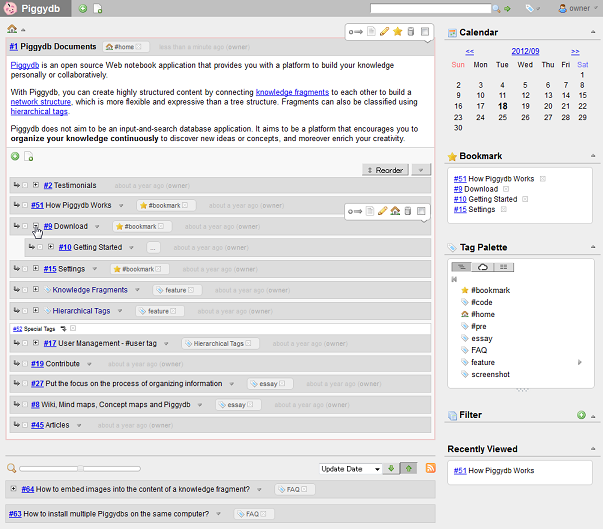
This change makes the home page (or home fragments) more useful so that you can navigate through the fragment trees smoothly without moving to a fragment page.
Interesting Discussion about Piggydb at outlinersoftware.com
Posted: September 11, 2012 Filed under: uncategorized 8 CommentsAn interesting discussion about Piggydb has been going on at outlinersoftware.com, which was mentioned in a blog comment (thanks, Alexander!).
Piggydb is a kind of software that is difficult to explain, so I have been struggling to find good words to describe this software to people who are not familiar with this organizing tool sphere (whereas I think the difficulty of explaining is important to invent a new paradigm).
Piggydb is certainly similar to an outliner.
By the way, in Japan, outliners are often called ‘Idea Processors’. I don’t know why, but I guess they focus on the MindMap-like functionality of a tree structure.
I think that an outliner is a basically one-theme-session-oriented organizing tool (like a MindMap), while Piggydb is for a longer span of idea exploration involving multiple themes. And also, there is the difference of the organizing processes: top-down (outliner) and bottom-up (Piggydb).
Then, most importantly, Piggydb has been striving to extend organizing or structuring functionality to promote concept discovery (structuring ‘information’ into ‘knowledge’ and more, ‘wisdom’ maybe). I’m going to write about it in detail in the series of articles ‘The Piggydb Way’.
Anyway, it is very inspiring to see discussions on a site like outlinersoftware.com. If you are interested in outliner software, definitely check it out 😉

 Piggydb
Recent Comments