
Piggydb V6.1 – Cleaned up the Main Menu
Posted: August 27, 2012 Filed under: uncategorized Leave a commentThis release cleans up the main menu bar. The menu items ‘Home’, ‘Filter’, ‘System’ have been removed from the menu bar. As a result of it, the menu bar has become a container for the tool buttons to create or find knowledge fragments.
The screenshot below is the old main menu:

and this is the new main menu:
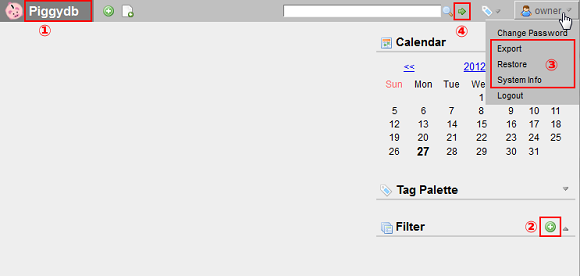
(1) The ‘Home’ menu has been removed and the title banner took on the function of a link to the home page. Come to think of it, it is more conventional implementation in the first place.
(2) The ‘Filter/New Filter’ menu has been moved to the sidebar and implemented as a tool button.
(3) The ‘System’ menu items has been moved into the user menu.
(4) The Jump-to-tag button has been replaced with a more general ‘Jump’ button, which allows you to directly jump to a fragment by inputting its ID number in addition to the original function to jump to a tag by its name.
Piggydb Supporters Edition Launched
Posted: August 20, 2012 Filed under: supporters 23 CommentsThe Piggydb project is going to celebrate its 4th anniversary at the end of this month. On this occasion, I would like to thank you for your support. It’s because of you, Piggydb users, that I can keep developing this small project.
In the hope of continuing the project for many years to come, I decided to try one of the ideas I thought about. That is ‘Piggydb Supporters Edition’.
Piggydb Supporters Edition is a special edition, which you can buy for $10 from here. And it provides the following features in addition to the standard features:
– User CSS (Cascading Style Sheets)
— You can override the default user interface style by writing your own CSS.
— Your CSS will be saved with your knowledge fragments in the database.
— You can apply your style to part of fragment’s text.
— You can apply your style to a specific fragment by an ID.
Of course, all minor version upgrades and bug fixes will be for free.
If you are interested in this project and want to see what it will turn into in the future, please consider supporting it by buying this edition 😉
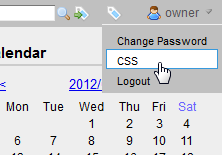
In Piggydb Supporters Edition, the “CSS” menu is added to the user menu and you can edit your own style sheets from it:
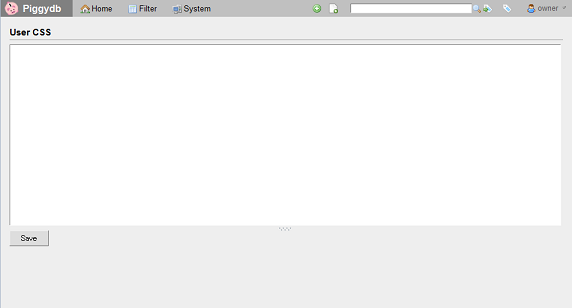
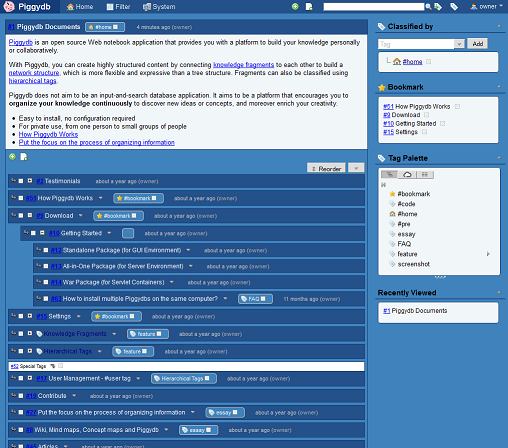
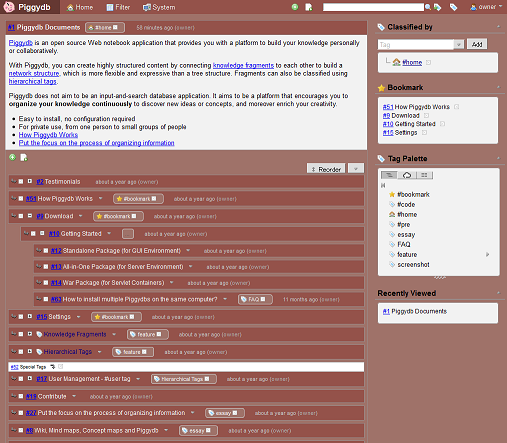
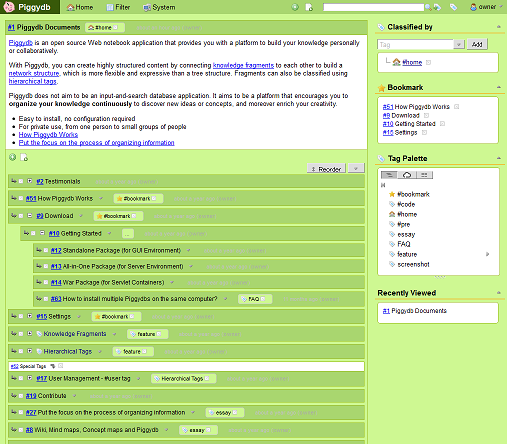
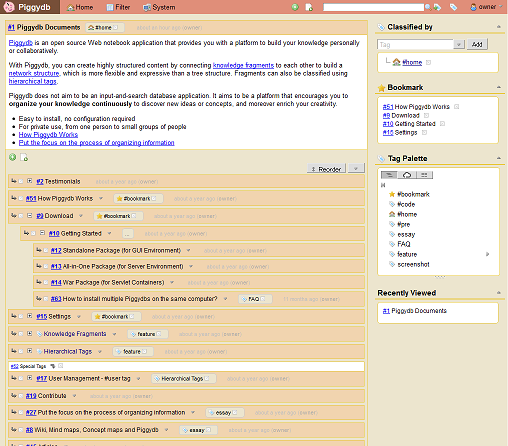
User CSS will be in effect immediately after you click on the Save button. The followings are the examples of customizing the color scheme. You can try these simply by copy and paste:
Blue:
.bgcolor-base {
 background-color: #4082BB;
}

table.fragment .header-cell {
 color: #F1F6F8;
 background-color: #24518A;
}

.fragment-header span.tags a.tag {
 color: #F1F6F8;
}

table.fragment td,
.content-box,
.content-box li.leafLastNode {
 background-color: #F1F6F8;
}

#title-banner table td {
 background-color: #143C78;
}

#page-menu #menu,
#page-menu #menu .topitem,
#page-menu #menu ul.submenu {
 color: #F1F6F8;
 background-color: #24518A;
}

#page-menu #menu .topitem a,
#page-menu #menu .topitem a:visited {
 color: #F1F6F8;
 border: 1px solid #24518A;
}

table.fragment td.subfragments,
table.fragment td.subfragments #children-control td {
 background-color: #4082BB;
}

table.fragment,
table.fragment th,
table.fragment td,
.content-box {
 border: 1px solid #143C78;
}

.section-title {
 border-bottom: 2px solid #24518A;
}
Brown:
.bgcolor-base {
 background-color: #9F7269;
}

table.fragment .header-cell {
 color: #F2F2F2;
 background-color: #94524A;
}

.fragment-header span.tags a.tag {
 color: #F2F2F2;
}

table.fragment td,
.content-box,
.content-box li.leafLastNode {
 background-color: #F2F2F2;
}

#title-banner table td {
 background-color: #653832;
}

#page-menu #menu,
#page-menu #menu .topitem,
#page-menu #menu ul.submenu {
 color: #F2F2F2;
 background-color: #94524A;
}

#page-menu #menu .topitem a,
#page-menu #menu .topitem a:visited {
 color: #F2F2F2;
 border: 1px solid #94524A;
}

table.fragment td.subfragments,
table.fragment td.subfragments #children-control td {
 background-color: #9F7269;
}

table.fragment,
table.fragment th,
table.fragment td,
.content-box {
  border: 1px solid #998D8C;
}

.section-title {
 border-bottom: 2px solid #998D8C;
}
Green:
.bgcolor-base {
 background-color: #CEF892;
}

table.fragment .header-cell {
 color: #000;
 background-color: #A9D66F;
}

.fragment-header span.tags a.tag {
 color: #000;
}

table.fragment td,
.content-box,
.content-box li.leafLastNode {
 background-color: #fff;
}

#title-banner table td {
 background-color: #385909;
}

#page-menu #menu,
#page-menu #menu .topitem,
#page-menu #menu ul.submenu {
 color: #000;
 background-color: #A9D66F;
}

#page-menu #menu .topitem a,
#page-menu #menu .topitem a:visited {
 color: #000;
 border: 1px solid #A9D66F;
}

table.fragment td.subfragments,
table.fragment td.subfragments #children-control td {
 background-color: #CEF892;
}

table.fragment,
table.fragment th,
table.fragment td,
.content-box {
  border: 1px solid #9FC029;
}

.section-title {
 border-bottom: 2px solid #E9CA46;
}
Soft:
.bgcolor-base {
 background-color: #ECE5CE;
}

table.fragment .header-cell {
 color: #000;
 background-color: #F1D4AF;
}

.fragment-header span.tags a.tag {
 color: #000;
}

table.fragment td,
.content-box,
.content-box li.leafLastNode {
 background-color: #fff;
}

#title-banner table td {
 background-color: #774F38;
}

#page-menu #menu,
#page-menu #menu .topitem,
#page-menu #menu ul.submenu {
 color: #000;
 background-color: #E08E79;
}

#page-menu #menu .topitem a,
#page-menu #menu .topitem a:visited {
 color: #000;
 border: 1px solid #E08E79;
}

table.fragment td.subfragments,
table.fragment td.subfragments #children-control td {
 background-color: #ECE5CE;
}

table.fragment,
table.fragment th,
table.fragment td,
.content-box {
  border: 1px solid #E9CA46;
}

.section-title {
 border-bottom: 2px solid #E9CA46;
}
You can also apply your style to part of fragment’s text. For example, write user css like below:

And specify part of text with the special markup when editing a fragment and the style will be applied to the text like below:
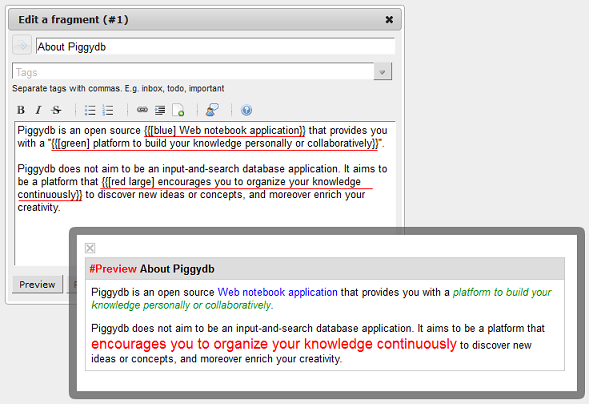
The text style will also be in effect in the document view.
The markup rule is:
{{[class-name] Here goes the content.}}
You specify a style you want to apply to the text by “class-name”. Multiple class names can be specified by separating them with spaces.
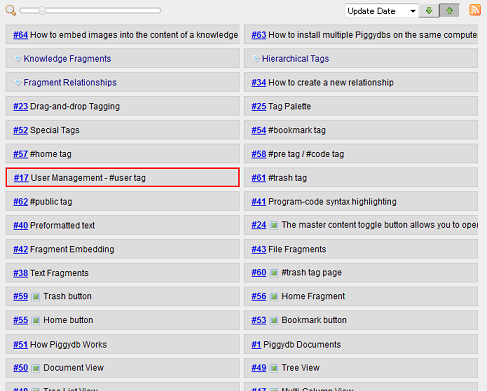
You can apply your style to a specific fragment by an ID. For example, write user css like below:
table.fragment-17 {
 border: 2px solid red;
}
Then, the style will be applied only to the fragment number 17:
There are many other usage of this feature. I will share other tips on this blog, so please keep your eye on it.
Click here to buy Piggydb Supporters Edition (Thank you for your support ;-))
Piggydb V6.0 released
Posted: August 19, 2012 Filed under: uncategorized Leave a commentThis release includes several bug fixes and minor improvements, and is released as stable version.
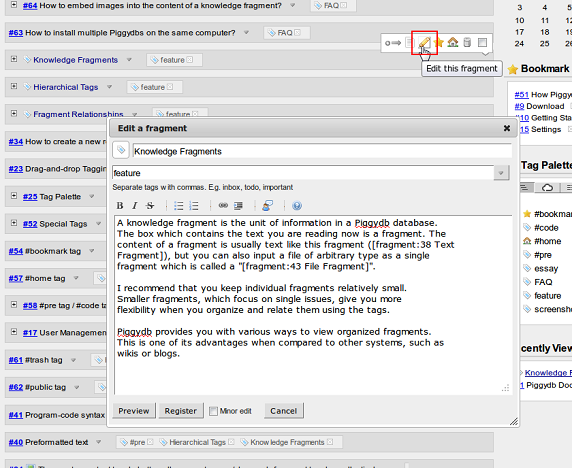
Since the beginning of June, I have gradually replaced the old fragment editors with the new dialog-style editor and completed it in the previous version.
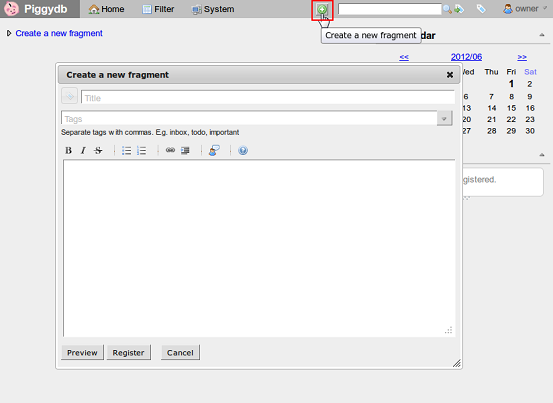
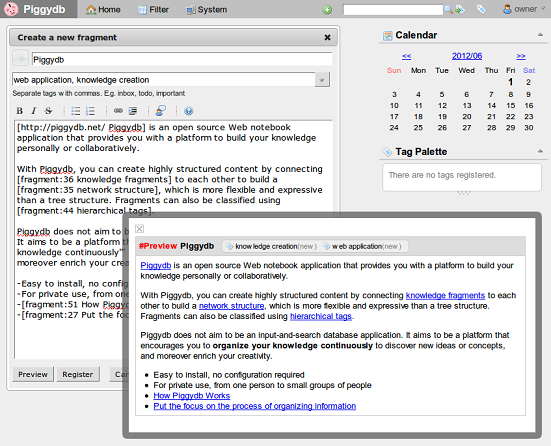
On-the-spot editing:
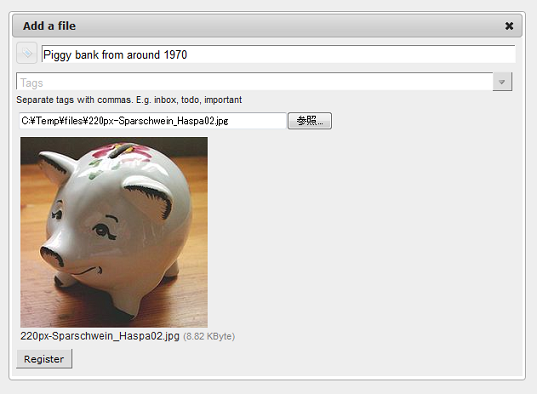
For a file fragment:
Piggydb V6.0-dev9 – New Editor in Tag and Filter Page
Posted: August 7, 2012 Filed under: uncategorized Leave a commentThis release switches the new-fragment form in the tag and filter page to the new editor:
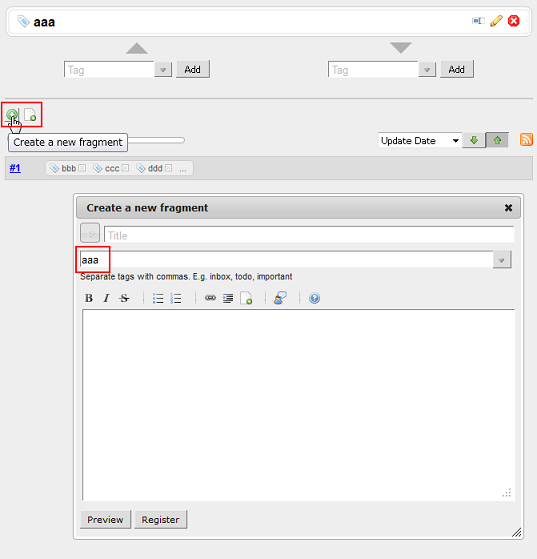
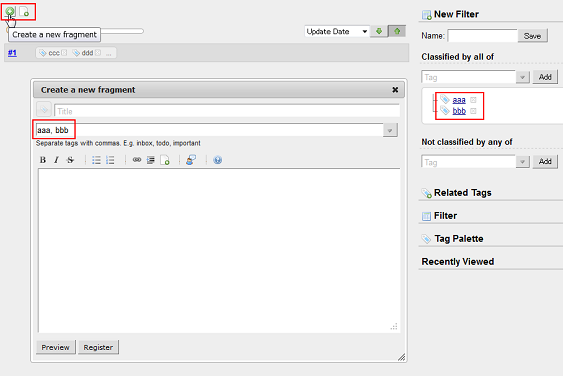
As you may already know, these forms have default tags derived from their context (the tag or filter concerned in the page) so that you can easily create fragments that fit into the context.
And finally, all of the old fragment forms have been removed and replaced with the new editor.
Piggydb V6.0-dev8 – New Editor for Related Fragments
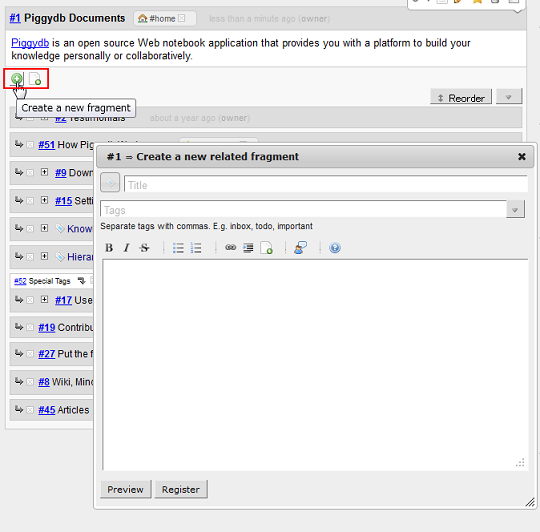
Posted: July 29, 2012 Filed under: uncategorized Leave a commentThis release switches the form of a new related(child) fragment to use the new editor:
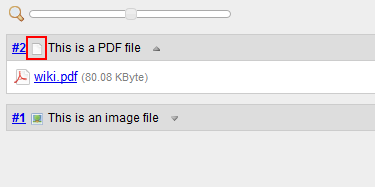
Before this version, only an image fragment has the type icon in its caption. This version adds a file icon to the captions of all file fragments and you can download the files via this icon:
The fragment editor itself has also been updated to have a shortcut to put a new line markup (“~”) when Shift+Enter keys are pressed.
Piggydb V6.0-dev7 – Full-fledged File Upload Dialog
Posted: July 17, 2012 Filed under: uncategorized 1 CommentAs several users kindly pointed out, the new file upload dialog did not have the inputs for the title and tags as the old editor. This was partly in order to simplify the first implementation of the new file upload mechanism, and partly because I thought the title of a file fragment might be redundant. But, I have changed my mind based upon the feedback, and in this version 6.0-dev7, these missing parts have been added to the dialog:
Piggydb V6.0-dev6 – Quick File Embedding
Posted: July 11, 2012 Filed under: uncategorized Leave a commentThis release adds a new “Embed a file” tool button to the fragment editor toolbar:
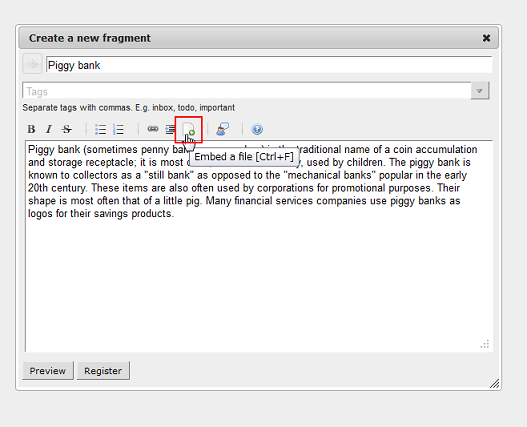
Clicking on the button opens a file dialog, which allows you to select a file to be embedded into the current caret position in the editor:
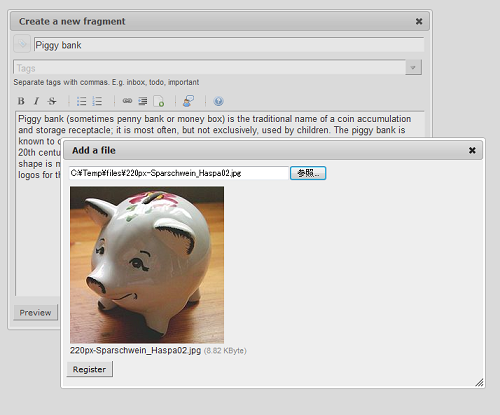
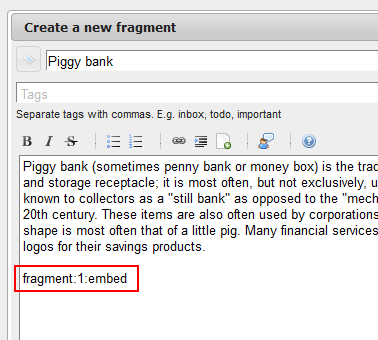
After the selected file is saved into the database, embedding markup will be inserted automatically as below:
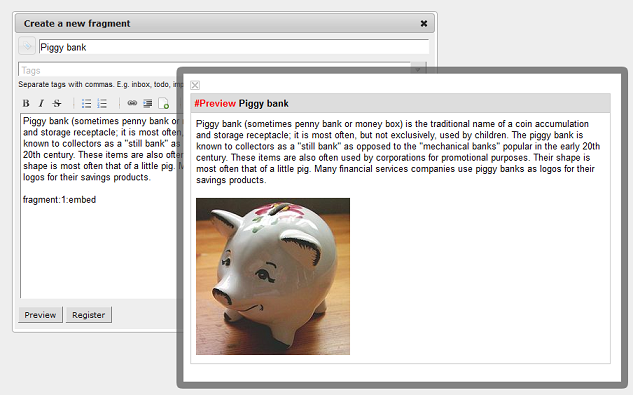
You can preview the content with the embedded files:
Piggydb V6.0-dev5 – On-the-Spot Edit for File Fragments
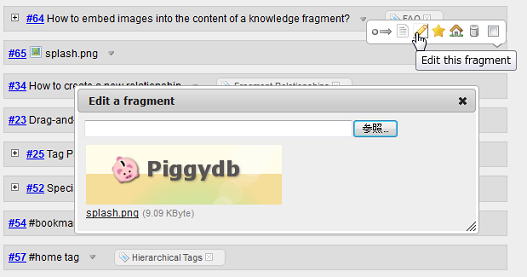
Posted: June 28, 2012 Filed under: uncategorized 5 CommentsThis release updates the “Edit this fragment” button in the fragment tool bar to support on-the-spot editing for file fragments:
Piggydb V6.0-dev4 – File Upload Dialog
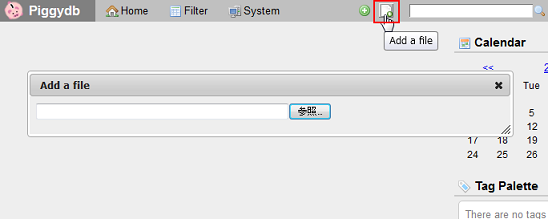
Posted: June 26, 2012 Filed under: uncategorized 2 CommentsThis release adds a global “Add a file” button to the main menu bar, which allows you to upload a file and register it as a knowledge fragment.
Clicking on the button opens a file upload dialog:
You can preview the content of an image file before registering it:
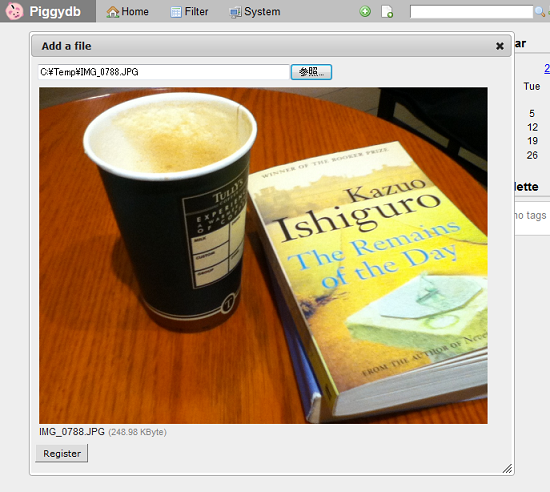
Now that you can create both a text and file fragment anywhere via the main menu bar, I’ve deleted the old fragment editor from the home page.
The Piggydb Way: #1 Tag as Concept over Tag as Index
Posted: June 20, 2012 Filed under: essay, thepiggydbway 4 CommentsIn this series of articles ‘The Piggydb Way’, I will try to explain why Piggydb is so unique and useful in terms of knowledge creation compared to other information management systems and how it will change the way you organize information. I will do my best by squeezing my limited English skills to convey the whole notion of what Piggydb is all about. Your feedback is always welcome.
—-
I guess many of you regard or use Piggydb as an organizable notebook. But why do you organize your information in the first place? In most cases, its purpose would be to make it easy to find a piece of information you need later on.
There are countless applications and services that provide tools to do these things: folders, trees, tags, hyperlinks, etc. Compared to these applications, Piggydb has powerful tools: Fragment Relationships and Hierarchical Tags. But here in this series of articles, I’d like to explain that Piggydb aims not only to provide such tools for organizing information, but also to seek further value by providing a way to build your own ‘concept’ maps.
The most important feature of Piggydb is ‘tags’. However, you may not need them if you use Piggydb as an organizable notebook. Actually when I used it in the recent work to manage the project related information, I did not use tags at all except the system tags (#home, #bookmark, etc). Just connecting fragments was sufficient to manage the information (multi-parenting perfectly worked to organize the complex information). Heavy users may have realized that the roles of fragment relationships and tags are overlapped because both have similar functionalities in terms of ‘grouping’ fragments. So if you just need to organize information on your daily life or work, it would be sufficient to use only either of them.
Well then, why am I saying tags are especially important in Piggydb?
Tagging has become one of the primary ways people organize information since Web 2.0 services adopted it as their important features. Tagging was introduced as a more lightweight alternative to the existing classification systems such as hierarchies. Hierarchical classification systems manage categories by single-parenting tree structure and their vocabularies should be controlled carefully in order to work properly (controlled vocabulary). Although tagging was adopted as an effective alternative to hierarchies, there is a trade-off between these two systems. Tagging is certainly more flexible and easier to use in the way you can attach multiple labels you come up with to a piece of information while hierarchies force you to select a single category following the existing hierarchy. But what will happen when the amount and varieties of information increases?
Japanese economist Yukio Noguchi argued in his best-selling book published in early 1990s that any attempt to classify information to make it searchable is useless in the first place. He pointed out the problems in classification. One of them is the ‘Bat Problem’ which arises when classifying information and goods. Material things and information can have multiple attributes that are used respectively depending on the context (e.g. Bats have the properties of both birds and beasts). He also referred to Wittgenstein’s ‘Family Resemblance‘ principle, which states that “things which may be thought to be connected by one essential common feature may in fact be connected by a series of overlapping similarities, where no one feature is common to all (from Wikipedia)”. This idea also shows the limits of the traditional taxonomy (known now as ‘monothetic’).
The most difficult thing in classification is to maintain its consistency in the growth of the database. Not only will your database grow, but you yourself will also learn and then need to change your classification system. Noguchi explained this by introducing the ‘Theorem of the Ugly Duckling‘, which was proposed and proved mathematically by Japanese theoretical physicist Satoshi Watanabe. Here is the quote about this theorem from the book “Apoha: Buddhist Nominalism and Human Cognition“:
From the formal point of view there exists no such thing as a class of similar objects in the world, insofar as all predicates (of the same dimension) have the same importance. Conversely, if we acknowledge the empirical existence of classes of similar objects, it means that we are attaching non-uniform importance to various predicates, and that this weighting has an extralogical origin. When we employ a concept, we usually understand that there is a group of objects corresponding to this concept that any two members of the group resemble each other more than a member and a nonmember. Two sparrows are very much alike, while a sparrow and a rose are not alike. It is natural to translate the term “to resemble” as “to share many predicates in common.” But this interpretation can be shown to lead to a denial of the existence of a class of similar objects by the following theorem, which I have dubbed the theorem of the ugly duckling. The reader will soon understand the reason for referring to the story of Hans Christian Anderson, because this theorem, combined with the foregoing interpretation, would lead to the conclusion that an ugly duckling and a swan are just as similar to each other as are two swans. (Watanabe 1969, 376)
Watanabe thought that any classification is arbitrary and inevitably biased by our cultural background.
With these problems in mind, you should realize that hierarchical classification turns to be only a representation of a limited perspective and how fragile it is for ever-changing knowledge management. Even tagging, which is more flexible and solves some of the problems such as the Bat Problem, cannot escape from the problem of maintaining consistency. Rather, in tagging where users can freely choose words, classification can more easily lead to the lack of control than hierarchies, for example, the resulting vocabulary will be filled with homonyms (the same tags used with different meanings) and synonyms (multiple tags for the same concept). To begin with, tagging has been popularized in the context of Folksonomy, in which searchability or comprehensiveness is not the major purpose of classification, but it aims at promoting communication among users triggered by matching tags for finding more valuable information efficiently.
I have explained how fruitless it would be to classify information for searchability so far, but it might not even need those stiff theories. You have probably experienced a situation where you had been organizing your classification with great effort, but you ended up not using most of it, and what you really needed was just a simple keyword search, haven’t you?
Still, I would be certain that there are many people who insist that it works, at least, for them, and actually there are such cases, which I call ‘Stable Classification Schema Case‘. The demo site Table Tennis Videos is a good example for this. But I won’t discuss this case further because it is not directly related to Knowledge Creation I want to focus on here.
So finally, after a long digression, I’m returning to the main point: why am I saying, in Piggydb, which does not have any features related to Folksonomy, the most important feature is tags?
The theorem of the ugly duckling proved that any classification is arbitrary, and this arbitrariness makes it difficult to maintain the consistency of classification, therefore, classification is quite limited as a way to build an index for information. However, if we change our point of view a little bit, on the other side of arbitrariness, couldn’t it be said that classification is creative in terms of expressing one’s thoughts, ideas, or lessons? As you know from tag clouds, your tags represent the essence of your database or lessons learned in the course of growing your database. In a traditional way of information management, the essence comes before building the content of a database, like defining a classification hierarchy as a container of information. What will happen if you reverse this process? You don’t create tags as a mere index for information, but as a reflection of your growing database and make them the central part of your knowledge.
I’m going to explain this reversal process more in depth in this series of articles, but before diving into it, in order to distinguish between these two tag usages, let’s call them respectively ‘Tag as Index‘, where tags are created for searchability, and ‘Tag as Concept‘, where tags are created to represent the important concepts learned in the growth of your database.
Next: The Piggydb Way: #2 Tags as First-Class Components

 Piggydb
Recent Comments